transmit, sell, monetize, reproduce, remix, alter or decompile “Rover Mission”.
create a remix pack using one or more files from “Rover Mission” and redistribute it.
But you also know that you are allowed to:
decompile, alter and remix “Rover Mission” for exclusive private use.
decompile, alter and remix “Rover Mission” for exclusive use in online videos, if you add credits in the video description (with a working link to www.creatorlabs.net): “Rover Mission: A resourcepack by CreatorLabs”.
monetise online videos using “Rover Mission”, if you add credits in the video description (with a working link to www.creatorlabs.net): “Rover Mission: A resourcepack by CreatorLabs”.
In general, you should pick your current Minecraft version, which you are playing with. Then the pack will definitely be compatible with your game. In case your Minecraft version is not listed here, you should pick the most recent one that is listed.
How do I know, which version I am using?
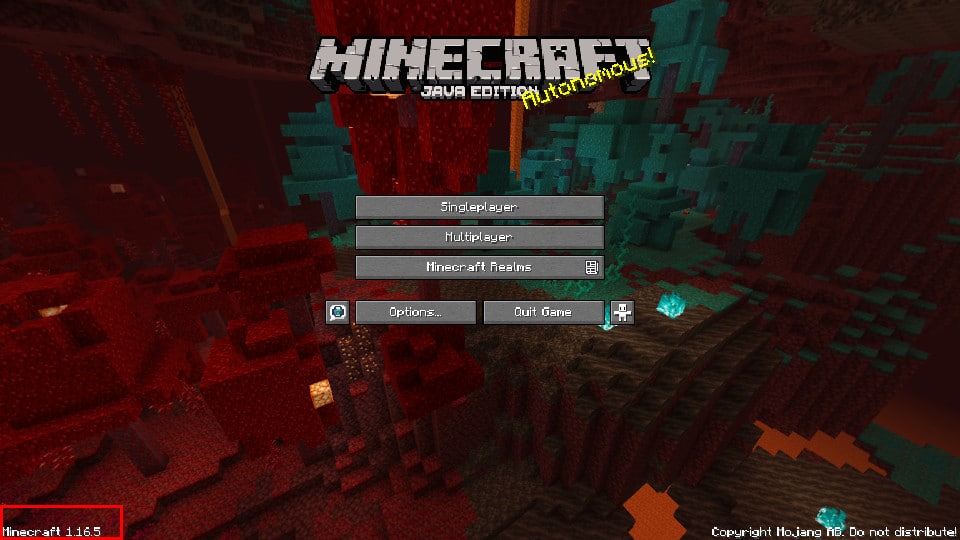
To find out, which version you are using you need to open up Minecraft and look at the title screen. In the bottom left corner, you will find the version number. You only need to look at the first part of the number. For example in this image, you can see Minecraft 1.16.
Which Minecraft Edition do I use?
While every version of Minecraft is still Minecraft, the differences between the Bedrock and Java versions can be quite extensive. To answer the question of which version you are using, you will need to open up Minecraft and look at the title screen. Then you will see the following difference.
Java Edition
Bedrock Edition
Java Edition
On Minecraft Java Edition, you will find the version number in the bottom left corner of the screen.
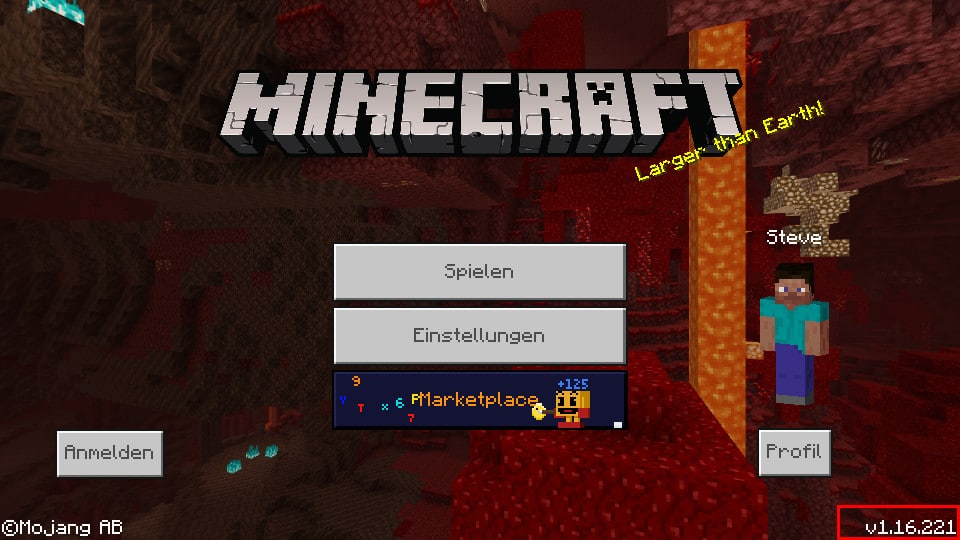
Bedrock Edition
Whereas on Minecraft Bedrock Edition, you will find the version number in the bottom right corner of the screen.